Advantech USB-5855 I/O board control in recent Ubuntu
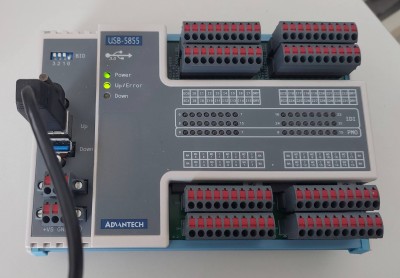
Advantech USB-5855 IO card is
32-ch Isolated Digital Input and 16-ch PhotoMOS Relay USB 3.0 I/O Module [2]
Written for Ubuntu 23.10
Ubuntu 23.10 reached its end of life in July 2024. The steps may need changes on newer releases.
Install the vendor driver and daemon
Installer can be downloaded from
https://www.advantech.com/en/search/?q=USB-5855&st=support as "DAQNavi Driver for Linux".
Run it in terminal as root or with sudo:
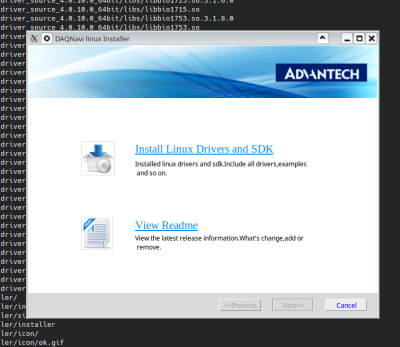
in installer window, click on "Install...", default install path (/opt/advantech) is fine. In driver selection, keep only:
* DAQNavi Linux SDK
* DAQNavi Linux Drivers
* DAQNavi USB5800 LinuxDriver
click next. Most likely, compilation of base driver library, and specific device driver will fail with X sign:
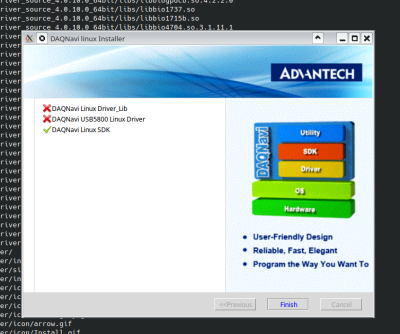
this is hint that we need to look better at kernel module compilation.
Patch the driver source code
Vendor claims support for quite old version of Ubuntu kernel.
Modify the generic driver module biokernbase.ko
Attempting to manually build base driver library ( make ) in
/opt/advantech/daqnavi_driver_source_code/linux_driver_source_4.0.10.0_64bit/drivers/driver_lib/src/kern/linux
reveals, that driver expects class_create() API call to accept two arguments, what is not true^[1]^ in current (14.2.2024) kernel. Quick inspection of kernel source reveals, that it should be enough to replace line
with
$ make and # make install should work now.
Result of this build is:
biokernbase.ko/etc/udev/rules.d/71-bionic-daq.rules
Build the device-specific driver for USB-5855
By running
In top /opt/advantech we see that our device is supposed to be supported by driver in drivers/usb5800dio subdirectory.
In particular dir, do make and make install.
Result is bio5800dio , no patches were needed.
Test the device
Now it's possible plug-in USB-5855 USB cable into our computer. In dmesg one can see:
[ 2321.197527] ****Advatech USB device descriptor:
[ 2321.197531] --------bNumConfigurations: 1; bcdUSB: 310;
[ 2321.197533] --------idVendor: 1809; idProduct: 5855 ;
[ 2321.197535] --------bcdDevice: 0; bMaxPacketSize0: 9
[ 2321.197536] set pipe#0[addr:0x2] stream size: 32
[ 2321.197610] set pipe#1[addr:0x82] stream size: 32
[ 2321.197689] set pipe#2[addr:0x5] stream size: 512
[ 2321.197768] set pipe#3[addr:0x85] stream size: 512
...
[ 2321.198306] --> board_id = 1 fw_ver = 0x104, pld_ver = 0x0, ret=32
Using test utilities, verify that we can see our device:
Test with dndev
Test device_enum
# ./dev_enum
+---------+---------------+-------------------------------+
| No.#    | Device Number | Device Description            |
+---------+---------------+-------------------------------+
| 0       | 0             | USB-5855,BID#1                |
+---------+---------------+-------------------------------+
| Total: 1 devices                                        |
+---------+---------------+-------------------------------+
#
Blink an LED with the Python SDK example
cd to Python example directory:
cd /opt/advantech/daqnavi_driver_source_code/linux_driver_source_4.0.10.0_64bit/examples/Python/DO_StaticDO
and modify staticDO.py in this way:
- patch string
deviceDescriptionto match device name printed by dndev above so in our particular case to:deviceDescription = "USB-5855,BID#1"
now we can try to light up first LED in port0 by running te example and submitting 1 as the value.
# python3 ./staticDO.py
Input a 16 hex number for D0 port 0 to output(for example, 0x00): 1
DO output completed!
#
if first LED is on, as at picture below, everything went correctly and we're done.
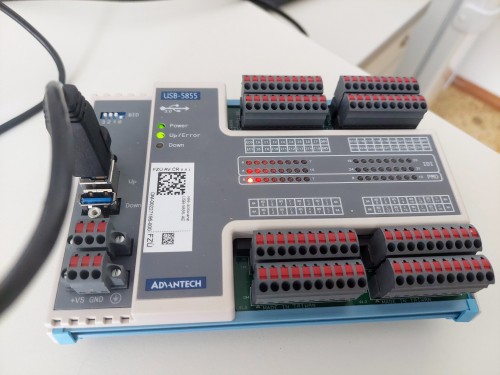
Because of how integers are internally represented, interesting value to test is -1. The python script is very transparent, and it can be easily patched to use CLI command arguments instead of interactive dialog:
Notes
Issue with Secure Boot
Modern Linux distributions enforce security consistency by validating cryptographic signatures of kernel and kernel modules. Indeed this tutorial doesn't cover this topic as we only compiled *.ko files.
If your system enforces kernel module signing, one can disable that using mokutil --disable-validation. (reboot and re-typing of temporary secret in GRUB needed)
In case of dual-boot with certain proprietary non-UNIX system, their security device validation procedure might fail, and manual type-in of backup security keys might be needed.
Software components
DAQNavi4 Device Monitor Daemon
started as systemd service by
runs /opt/advantech/daqnavi_daemon/daqnavi_daemon
the full functionality is not yet understood. Analysis of system calls issued by this daemon reveals, that it attempts to interact with /var/lib/daq/daqnavi.config.db, most SQLite3 config database file used by this binary.
udev rule file
placed in
triggers run of daqnavi_daemon when device is plugged-in.
Character devices /dev/daq0 and /dev/daq255
created by driver, reprenent device in dev tree.
SQLite3 database daqnavi.config.db
located by default in /var/lib/daq. When removed, breaks the funcionality of Python SDK.
Contains both static and run-time variables of system, eg here we can see the information about USB connectivity of our device:
# sqlite3 daqnavi.config.db
SQLite version 3.42.0 2023-05-16 12:36:15
Enter ".help" for usage hints.
sqlite> select * from device_map;
0|2087|1|0|1|0|3|bio5800dio|/dev/daq0|USB-5855,BID#1|||/USB/usb-0000:05:00.3-1.2.4.1
sqlite>
#
Troubleshooting
1) read logs to figure out what's wrong 2) fix that :)
References
[1] https://www.kernel.org/doc/html/v6.5/driver-api/infrastructure.html#c.class_create [2] https://www.advantech.com/en-eu/products/1-2mlkno/usb-5855/mod_69395467-3fd1-4851-a8a5-60b30462a26b